AI Print on Demand Workflow 2026: From Propt to Live Product in 15 Minutes
A 15-minute, end-to-end AI POD workflow — prompt, upscale, mock up, list, publish — with the copyright and Etsy disclosure rules you cannot skip.
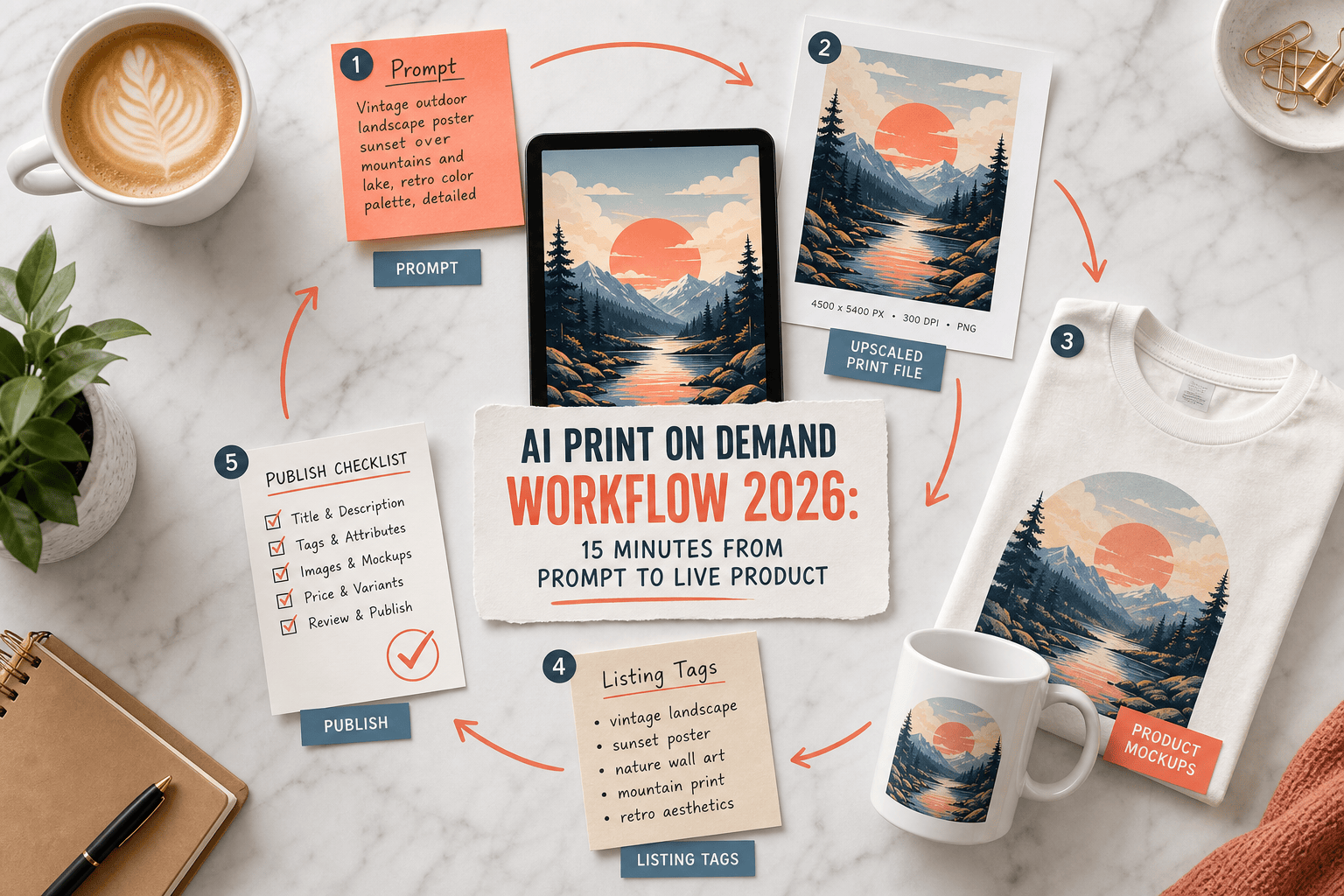
A print-on-demand product used to take a weekend: sketch, Photoshop, mockup, listing copy, sample, publish. In 2026 the same job can be done in a coffee break, because almost every step of the stack now has an AI layer bolted onto it. Printify now ships a built-in AI image generator with 15 free generations a day, Midjourney v7 produces 2048×2048 artwork at usable quality, and ChatGPT writes a passable Etsy listing in one prompt.
What it does not do is absolve you of making good creative choices, or of following the rules around AI art that platforms and courts tightened again in early 2026. This guide walks through a realistic 15-minute AI POD workflow, then flags the bits you cannot skip without getting burned.
The 15-minute workflow at a glance #
| Minutes | Stage | Main tool |
|---|---|---|
| 0 – 4 | Prompt and pick a design | AI image generator |
| 4 – 7 | Upscale and prep the print file | AI upscaler |
| 7 – 10 | Mockup and product setup | POD platform mockup tool |
| 10 – 13 | Listing copy and SEO | ChatGPT or equivalent |
| 13 – 15 | Publish with disclosures | Etsy / Shopify / storefront |
Fifteen minutes is a genuine stretch target — most sellers land around 20 once they stop rushing. But every stage on this list used to take 30 minutes by hand, which is the whole point.
Minute 0 – 4: Prompt a design you would actually buy #
Pick a niche before you open the tool. AI image generators punish vague prompts. “Cute cat t-shirt” produces the same mid-journey sludge it did a year ago. A narrow prompt that specifies product, style, era and mood does not.
Three credible starting points:
- Printify’s built-in generator — free with a Printify account, 15 generations every 24 hours, commercial use permitted on Printify products under its third-party AI terms. Best for low-friction shirt and mug designs where you do not want to leave the platform.
- OpenArt — browser studio with multiple models, inpainting, character consistency and image-to-video on paid tiers. Best when you need a small set of designs that share a recognisable look.
- Midjourney v7 — still the quality benchmark for illustrative work. Native output is 2048×2048, so it needs upscaling for anything larger than an A4 print.
Whichever you pick, write the prompt as: subject, style, composition, mood, palette, output format. Keep the first five generations as “thinking out loud” — you are calibrating the model, not picking a winner. The sixth or seventh is usually the one.
For the niche itself, Printify’s trend data and a ten-minute skim of Etsy’s Trending Now are cheaper than any “AI niche finder” tool.
Minute 4 – 7: Upscale, clean and export #
Raw AI output rarely survives print. Midjourney’s own docs confirm that v7 generates at 2048×2048 pixels — fine for a mug wrap, but short for a wall-art A2. DPI is a red herring here: printers read actual pixel dimensions, so bumping a 2048 px file to “300 DPI” in Photoshop without resampling does nothing.
A minimum-viable file-prep routine:
- Upscale to roughly 4000–5000 px on the long edge for apparel, 6000+ px for posters. Free option: Upscayl. Paid options: Topaz Gigapixel AI or Let’s Enhance.
- Remove the background if the garment needs it. Printify, Printful and Canva all ship a free background remover that is good enough.
- Zoom to 100% and scan the edges for AI tell-tales — warped hands, floating limbs, broken text. Fix or regenerate. An AI-generated design with a visibly broken hand will kill conversion no matter how well you wrote the listing.
- Export as a transparent PNG (apparel, stickers) or high-quality JPG/PDF (posters). Confirm the file size matches your chosen POD supplier’s spec sheet.
Never skip the 100% zoom. It is the single cheapest step and it catches most print-quality disasters.
Minute 7 – 10: Mockup and product setup #
Once the file is clean, pick a POD partner and push through the mockup step. If you already did the work in choosing a POD platform, this is where that pays off.
- Printify and Printful both have web-based mockup tools good enough to skip Placeit for standard apparel.
- Gelato is the pick for EU or global wall-art with local production and lifestyle mockups.
- Canva is worth the detour only if you need a lifestyle shot with a human model; Smart Mockups inside Canva Pro is still the easiest path there.
Three things that routinely slow sellers down at this stage:
- Placement by eye, not by grid. Use the supplier’s print-area guide, not vibes. A chest print that sits 3 cm too low ships 3 cm too low.
- One mockup only. Listings with 4–6 mockups convert measurably better than single-shot listings, and AI mockup variants are effectively free.
- Skipping the sample. The temptation after a 10-minute design phase is to publish straight away. Don’t. Order a single unit before you run any paid traffic.
Minute 10 – 13: AI-assisted listing copy #
This is where generative AI genuinely earns its keep. A decent prompt to ChatGPT, Claude or Gemini will produce a title, 13 Etsy tags, a description and alt text in one shot.
A minimum-viable listing prompt:
“You are an Etsy SEO copywriter. Write a 140-character title, 13 tags (≤20 chars each, multi-word phrases), a benefit-led description under 300 words, and image alt text for this product: [describe product, niche, audience]. Use British English. Do not include emojis.”
Then edit the output. The house style of every major LLM leaks through — “perfect for”, “elevate your”, “whether you’re” — and buyers notice. Strip the clichés and add one specific sentence that only a human seller could write (who the design is for, why you made it, the story behind it).
If you use a paid tool, Printify’s bulk product creator and standalone services like Listing Optimization AI feed real search-volume data into the generation step, which is worth the subscription once you are creating more than 20 listings a week. Below that volume, a good prompt in a free LLM is fine.
Minute 13 – 15: Publish — with the disclosures that matter #
This is the step most AI POD guides gloss over. Get it wrong and your shop disappears.
Copyright. In the US, works created entirely by AI are not eligible for copyright protection. The US Supreme Court declined to hear the Thaler case in March 2026, leaving the “human authorship” rule intact. That does not stop you selling the product — it stops you enforcing copyright against a copycat. Solution: add real human editing (composite, type treatment, colour grade) so the final design is a human-authored work that happens to contain AI elements.
Etsy disclosure. Etsy’s Creativity Standards require sellers to disclose the use of generative AI in the listing description. AI prompt bundles are banned outright. Put the disclosure in the first paragraph of the description, not buried at the bottom.
Platform terms. Check the AI tool’s commercial licence. Midjourney Standard and Pro grant commercial use, Printify’s in-house generator grants it on Printify products, but some free-tier tools quietly restrict commercial output. If you cannot find a clear commercial-use clause, assume you don’t have one.
Keep the receipts. Save your prompts, iterations and layered edit files. If a takedown or dispute lands, the paper trail is what proves you played a meaningful creative role — which is also what Etsy’s “Designed by a seller” category requires.
Where this workflow breaks down #
Fifteen minutes is a ceiling, not a floor. The workflow stops working when:
- You skip the sample. Print quality on AI designs varies more than on vector art. A sample is non-negotiable before running ads.
- The niche is saturated. If 50 sellers published the same “vintage cat astronaut” design last week, a faster workflow will not save you. Differentiation comes before speed.
- You batch without editing. Publishing 40 AI designs in an afternoon with no human pass is how shops get flagged by Etsy’s AI enforcement. One edited listing beats ten raw ones.
- You ignore the stack after publishing. The same LLM that wrote the listing can write your product descriptions for Pinterest, social captions and email — spend five of your saved minutes there, not on another design.
Frequently asked questions #
Can I legally sell AI-generated designs on Etsy and Shopify? #
Yes, with conditions. Etsy allows seller-prompted AI art under “Designed by a seller”, provided you disclose AI use in the listing and you played a meaningful creative role (prompting, editing, curation). Shopify has no blanket restriction but you must honour the AI tool’s commercial licence. Prompt bundles themselves cannot be sold on Etsy.
Do I need Printify Premium or Printful Pro for the AI tools to work? #
No. Printify’s AI Image Generator works on the free plan (15 generations per day). Printful’s Design Maker is free and lets you upload externally generated AI artwork. Paid plans unlock lower base costs, not extra AI features.
What resolution should an AI design be for a t-shirt versus a poster? #
For apparel, aim for 4000–5000 px on the long edge at the printed size. For A3 or A2 posters, target 6000+ px. Midjourney v7 outputs 2048 px by default, so budget a minute for an upscaler such as Upscayl, Topaz Gigapixel, or Let’s Enhance.
Can I copyright an AI-assisted design? #
You cannot copyright the AI-generated portion itself, but you can register the human-authored parts of a composite design — layout, type, edits, combined elements — and you must disclaim the AI components when you register. For any product you plan to defend commercially, add substantial manual work and keep the layered file.
How long does this workflow really take once you are fluent? #
Experienced sellers report 20–30 minutes end-to-end for a single product, dropping to 10–15 minutes per product when batching (one prompt session, one mockup session, one listing session). The 15-minute figure is realistic once the stack is set up, not on your first attempt.
Next step #
Speed is only useful if it points at the right partner. Before you start batching designs, make sure the POD supplier underneath the workflow fits your plan — browse the full Printsgram print-on-demand directory and filter by region, product type and integration to see who actually matches your niche.